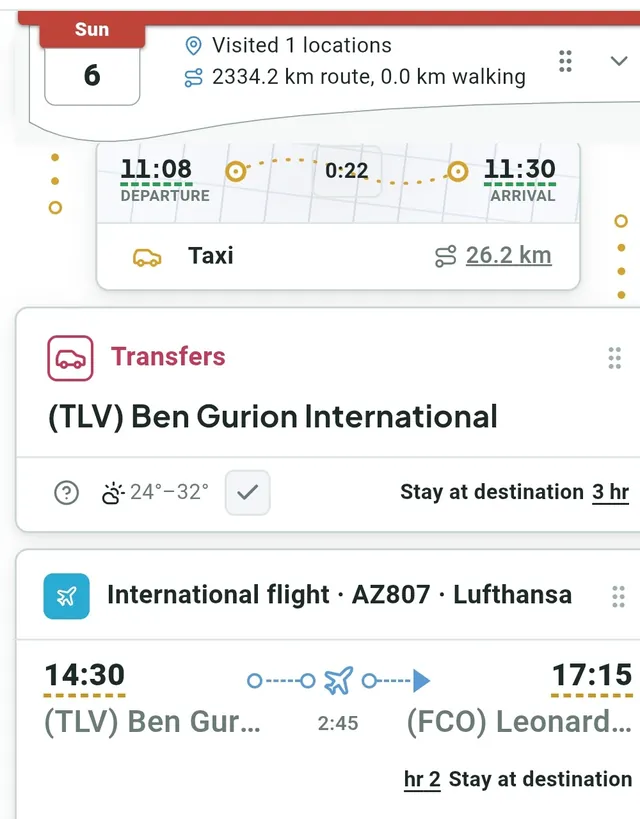
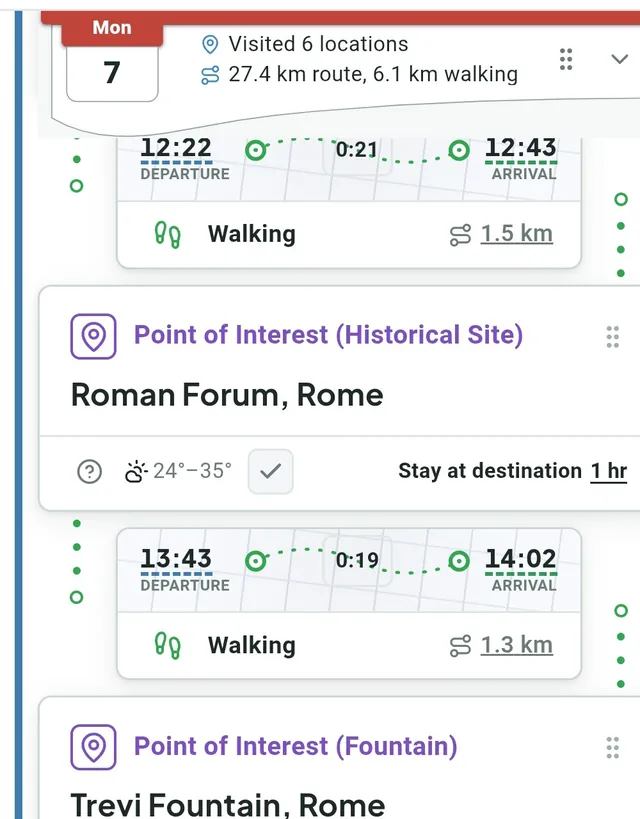
MyTrip Builder builds a complete daily itinerary — points of interest, restaurants, hotels and transfers — with real distances and arrival times from Google Maps. On mobile too.
While MyTrip Builder is in public beta, every member gets a base allowance, and early members get more. Benefits may change.
Every member: 1 trip of up to 9 days, 30 Google map searches and 60,000 AI assistant tokens a month.
Community founders (the first 100 active members, meaning those who saved a first trip): 3 trips of up to 21 days, 90 map searches and 180,000 tokens a month, through the beta and for two months after launch.
Travel journals: each complete travel journal that gets approved adds 2 trips, 60 searches and 120,000 tokens a month for two months after launch, up to two journals.
Benefit or invitation code: if you received a code, enter it on the “My quotas” screen in the app. One code can be redeemed per account.
Shared cap: to keep the service stable there is a monthly usage cap shared by all members. If it is reached, map searches or the AI assistant pause until it resets.
Benefits and allowances may change. Your own allowances are always shown on the “My quotas” screen in the app. What changed: Updates.
Everything that used to be scattered across a map, a spreadsheet, and a WhatsApp group — now in one place.
Less coordination, more trip
Trip planning spread across one map, a second spreadsheet, and a third WhatsApp group — and in the end no one’s sure how long it actually takes to get from the hotel to the first stop. MyTrip Builder puts the whole itinerary in one place: every stop, every stay, and every leg between them, in the correct chronological order, with the real distance and time recalculated automatically on every change.
01
Real distances and travel times between every stop, recalculated automatically on every edit
02
Switch the interface language at any time, right-to-left layouts included
03
The trip is saved to the cloud and waiting for you on any device — phone, tablet, or computer
With the Trip Wizard's help, we'll design your trip template down to the last detail
Two ways to start — your choice, in a few clicks.
Quick start
Start from a ready template
Enter a trip name, destinations, dates, number of travelers and how you get around — the wizard builds a ready starting template (flights, airport transfers, a hotel for each stay and a section for every day) that you can edit and expand later.
Self-planning
You already know exactly what you want
Enter a trip name, travelers, destination and dates — and go straight into entering the concrete flights and hotels you’ve already booked.
1International flightsThe flight you booked, round-trip, including the flight number.
2Domestic flights (round-trip)Domestic flights between cities at your destination, if your plan has any.
3HotelsEvery hotel you booked, with check-in and check-out dates.
Every flight can automatically add a transfer to/from the airport, and every hotel — a transfer to the next one. Add as many flights and hotels as you like, and edit the trip details again later through the same wizard.
System capabilities
Not another TODO list. One system that understands location, time, and route — and keeps them all in sync.
Pre-Trip
Pre-flight management
A built-in checklist for everything to sort out before heading to the airport: reservations, travel documents, and extra items, each in its own category. A progress bar at the top shows how much is left, and every item can be marked complete and have a document attached. Flight packing and the shopping list are managed as separate pages, with direct navigation from the main checklist.
Trip Planning
Detailed trip management with frames and cards
The trip is built from two layers: frames (the whole trip, each hotel, each flight leg) that contain record cards for every activity, ride, and stay. Frames can nest inside one another, be given a type for tailored styling, and whole days can be dragged and dropped between them. Every frame shows its own collapsible summary — total cost, distance, and where relevant a count of flights, hotels, and attractions.
Trip Planning Wizard
The wizard opens from the actions menu and builds a full trip skeleton for you in a few clicks: basic details, international flights, round-trip domestic flights, and hotels. Every flight can automatically add a transfer to/from the airport, and every hotel a transfer to the next one. Add as many flights and hotels as you like, and edit the trip’s details again later through that exact same button.
AI capabilities for trip organization
In the Trip Wizard you enter a trip name, destinations, dates and how you get around, and the system builds a ready starting template you can edit and expand. Alongside it there’s also an AI assistant for suggested activities and route ideas while you edit the trip.
Controlled chronological view
The system checks that each day’s records are ordered correctly by time, and warns if something is out of sequence. A one-click auto-sort button reorders all of a day’s records instantly, so you don’t have to drag and drop manually when something shifts.
Precise planning by time and distance
Every time field on a record is color-coded by its source — green for auto-computed, blue for inherited from the previous record, gold for pulled from a real flight number, and no color for manual entry — so it’s always clear where the time came from. Walking, driving, and public-transit distances are calculated from the actual route between stops, not a rough estimate.
My flights management
A dedicated screen collects every flight in the trip in one place, and lets you refresh all of them against real API data with a click — instead of hunting for each flight separately among the records. Especially useful after an airline schedule change.
My hotels management
A matching hotel screen lists every hotel in the trip with each one’s location-verification status, and offers a manual search for any that isn’t verified yet. This makes it easy to confirm every hotel in the trip is correctly identified in Google, without going record by record.
Expense management
Every record in the trip has its own cost and currency field, fillable in any supported currency. A whole hotel frame can also carry an overall cost (e.g. a bundled booking price), which is included in the totals alongside individual record costs.
Automatic time calculation
An auto-computed time field (shown in green) takes its value from the actual travel time from the previous stop, with no manual entry needed. When something upstream in the route changes — a location update, a reorder, or a switch to a different arrival method — you can refresh that calculation for the whole trip with one click via “Recalculate routes & times”.
Time management
Every record’s start and end times are directly editable, and a separate “stay” tag sets how long you remain at the destination — a value that affects the NEXT record’s start time, not the current record itself. This lets you control each day’s schedule with high precision without losing the connection between records.
Distance calculation and control
The distance between any two stops is calculated by the actual arrival method — walking, driving, or public transit — not as a straight line. The “Recalculate routes & times” button in the management menu refreshes every distance in the trip together, whenever you need to make sure everything is current after heavy editing.
Weather forecast at the destination
The record card shows an up-to-date weather forecast for the destination and relevant date, updating automatically without needing to check an external app. This lets you see at a glance both what’s planned and what to dress for.
Alerts and reminders
Default rules by record type — like a reminder for online check-in before a flight, or to pack up before hotel checkout — are added automatically to the relevant records. You can view and manage every active reminder in the trip from one dedicated screen.
Notes on every record
Every record has its own free-text notes field, alongside a separate personal-experience field that isn’t shown in the main table but is included in the travel journal generated at the end of the trip. This lets you record both operational details and personal impressions without the two mixing.
Budget control
The costs of every record and frame in the trip roll up automatically into a grand total, in whichever display currency you choose. A collapsible summary on every frame shows its own relevant amount separately, so you can check the budget at the level of the whole trip or of a single hotel or flight leg.
Real flight data based on flight number
When you enter a real flight number, the record is pulled from live API data instead of manual entry — its time fields are then marked in gold, flagging that the source is a real flight, not an estimate. The “Flight management” screen refreshes all of these flights together against current data.
Import routes from Google Maps
Paste a multi-stop Google Maps directions link (Share → Copy link, after planning a route with several stops) and import it straight into the trip. Every stop in the imported route automatically becomes a separate attraction record, ready for further editing.
Location verification
In any origin/destination field, typing a place name triggers a Google Places search, and picking from the list “verifies” the location. An unverified place is shown as plain text only, without the extra details a real verification unlocks.
Preview for every verified location
Clicking a verified location’s icon opens a full Google preview: photos, rating, and opening hours, straight from the record card. No need to leave to an external app just to check what a place looks like or when it’s open.
One-click route opening straight to Google Maps
Every stop with a calculated route gets a direct one-click link to navigate in Google Maps — both at the individual record level and as a combined route link for the whole day. Especially handy when you’re actually heading out and need live navigation.
Detailed daily route view
Every day is shown as a chronologically ordered list of records, with each record rendered as a pair of cards: an arrival card with departure/arrival time and an arrival-method icon, and a location card with the record’s type and destination name. An additional “flow” view shows the same day as a chain of icons connected by arrows, for a quick overview of the structure without diving into detail.
Check-in for every task with matching time updates
Every record with a destination includes a check-in button that confirms the actual arrival time, not just the originally planned time. Confirming check-in updates the rest of the day’s schedule accordingly, so a delay or an early arrival doesn’t stay stuck on just that one record.
Personal rating for every destination
Every record includes a personal rating, alongside a free-text experience field that captures your real impression of the place. The rating and personal notes aren’t shown in the main editing table, but they’re the primary source of content for the travel journal generated at the end.
Upload photos and files to every record
Every record can carry its own attached photos and files — a booking confirmation, a ticket, a photo from the place — straight from the editing card. A central file manager shows every file attached to the trip in a folder view, organized by which record it belongs to.
SOS emergency mode, everywhere
A dedicated SOS page automatically detects the local emergency numbers — police, ambulance, fire — for the country you’re currently in, and displays them ready to tap.
Save & Share
Share the trip in several formats
You can share the trip in three ways. As a link you send on WhatsApp or copy: view-only (anyone with the link can open it, no sign-in needed), full editing, or group mode where everyone adds a rating and a personal experience (editing and group mode need a Google sign-in). Sharing by link needs the trip to be saved in your account first.
Save trips to the cloud
When you are signed in, every trip is saved to the cloud automatically as a record of its own — with no file to save anywhere. Your trips are available on any device you sign into, you can load any of them back with a click, and delete each one individually.
Wrapping Up
A complete snapshot of the trip
A collapsible summary on every frame shows all the activity at a glance: flight count, hotels and nights, attractions, tours, restaurants, and average rating — alongside total distance and total cost in whichever currency you choose. You can check this picture at the level of the whole trip or focus on a single frame, at any stage of planning or during the trip itself.
Generate a detailed travel journal
With one click the system generates a styled travel journal (a trip diary) that gathers all the trip’s personal documentation — ratings, notes, and experiences from every destination — in chronological order. Share it as a link, or publish it to the shared journals so other travelers can read it, like it and comment, and keep one complete record of the trip.
Travel journals from real trips
Day-by-day journals that travelers published: places, ratings and personal notes you can read, like and learn from.
Read real trips
Browse complete journals, day by day, with the traveler’s own ratings and notes.
Find your destination
Filter by city, budget and trip type, and sort by what other travelers liked most.
Import a route
Start your own trip from a journal’s route. Costs, notes and personal details are never copied.
Share yours
Publish your own journal and get likes and comments from other travelers.
Five steps, from the first idea to a trip you can share.
1
Build or import a trip
Start with one question: do you already have a plan?
I don’t have a trip plan: enter a name, destinations, dates (or approximate ones), the number of travelers and how you get around, and within a minute a ready template is created: flights, transfers, stays and a day for every date.
I have flight and hotel bookings: enter what is already booked in the wizard, meaning flights, airports, hotels and check-in and check-out dates, and the trip is built around the bookings. You can add transfers to and from the airport too.
I found a route in another traveler’s travel journal: press “Import route” in the journals gallery and start a new trip from it. Costs, notes and real dates are never copied, and you choose the dates yourself.
I prefer to build it myself: create a frame, add a day and then add records one by one.
You can try the app without signing in. To keep the trip, sign in with Google.
2
Update flights and hotels with the real details
Started from a template? Search flights and hotels, then update it with the real details.
The booking window opens ready search links with the destination and dates from your trip.
“Update trip details” enters real hotel names, flight numbers and dates, and updates the trip in place without deleting what you already added.
The template is a starting point: until you update it, its flights, hotels and times are default values.
3
Build the daily route
Fill each day with stops, by hand or with an AI. Times follow each other, and the distance and time from the previous stop are calculated.
Add them yourself: a site, a restaurant or an activity. Each record has a place, a time, how you get there and a cost. Drag to reorder, or sort by time in one click.
AI assistant: choose up to 7 days and what to plan, and the app prepares a ready request for Gemini, Claude or ChatGPT. You send it (the app sends nothing to them), and you import the route it returns into the trip in one click. A place the AI suggested is marked as not verified, and you verify it in the next step.
Import from Google Maps: paste a link to a route or a place, for example one you built in Maps or the AI suggested, and it becomes records.
Recommended: a Google Maps search for restaurants, bars and sites around a city, a place in your trip or the end of a day. Save it to a list or add it straight to a day.
Route for the day: every day has a link that opens all its stops in one Google Maps map.
4
Verify places and keep track
Verify a place against Google Maps and get a preview and the real distance and travel time. The alerts bell shows what is still missing.
How to verify: pick a place from the list in the destination field, or press “Verify places” under a day’s heading to verify all of that day’s places together. Each place is one search from the monthly allowance, and verification starts only when you press.
What you get: a green tick next to the place, and a click on the place icon opens a preview with photos, a rating and opening hours. Distance and travel time are calculated for the arrival method you chose.
The alerts bell: shows the progress of flights, hotels, verified places and planned days. What is missing becomes “pending” in the two weeks before the trip, and red in the last three days.
Reminders: check-in for a flight, heading to the airport, boarding and check-out are added automatically, and you can turn on browser notifications too.
5
Save, share and publish
The trip saves automatically to your account and opens on any device. Share it with a link, and publish a travel journal when you are back.
Automatic saving: when you are signed in, every change is saved to the cloud, every minute and also immediately when you leave the page. Each trip is saved separately, and you can load it on any device from the account window. Without signing in the trip is not saved.
Sharing with a link: “Share trip” and choose a mode: view only, full edit (for those who sign in with Google), or group, where friends add a rating and a personal experience without changing anything else.
Travel journal: the trip becomes a day-by-day journal with photos, ratings and impressions. You publish it on the site, and it is public: other travelers read it and import its route.
Before publishing: publishing is final, one journal per trip, and only a full journal is published. The “Check travel journal” button shows what is missing.
And more: files, expenses and a trip checklist are kept with the trip.